Friday, February 12, 2016

Production Post 3 : "A link is only as long as your longest strong chain"

Simple, elegant, and intuitive solutions to programming challenges are always ideal. One particular programming challenge we have been faced with throughout the project has been making the tail move properly, and unfortunately an intuitive solution is not possible. There are a lot of caveats that come with making our dragon move, and documenting the current approach should make for a useful blog post.

In the midst of these huge modifications and upgrades to the game to get the game ready for feature lock, fixing the tail has become a lower priority task. But, last night, I stepped Zac through the tail code, explaining a lot of the how's and the why's of the algorithm. It proved to be very valuable, so I'm going to do the same in this post. Specifically, I will focus on the section of the algorithm that deals with the dragon bouncing off the bounds of the world (a circle).

Before we start, I'd like to note a couple things. The tail is broken up into individual node structures, each doubly linked with a parent node and a child node. This structure is contained in the DragonHead class. I have already explained in my previous post how the dragon's head acts as the managing class for the tail, so I won't go into that here.

The Reflect Component of the Algorithm

Let's start with the simplest part: the physical reflection. It is one line of code:


This line of code simply reflects the node off the wall, in the exact opposite way it was facing (without inverting the head's up vector like it used to).

Now, we'll go in-order in code with what happens when the head first hits the wall. The head hits the wall and calls that Reflect() function on itself; the rigidbody also accounts for this reflection.

The head then tells its child (the first tail node behind the head) that it has reflected. It's functionality is described in the comments.


Without worrying about the math here, the crux of this function is to calculate the time it will take the current node to reach its parent's reflect position given its current velocity. Then, given this reflectionTFinal, the node knows when to reflect itself. A new gameobject with the same transform and velocity as the parent is created, and the node follows that transform for the given time in the same way it would follow its real parent.

The Problem

This is inherently wrong, as the velocity changes due to an acceleration (via rotation), if the parent was not moving perfectly straight at the time of collision. I will address this later. A funny tidbit about this function: when Zac came over we got to this and I was calculating the distance with a standard distance check using Pythagorean distance. But, after changing it to a Vector3.Distance call from Unity's Vector3 library, we saw a significant increase in reflection stability. We were baffled by this: how could this very rudimentary calculation be wrong?? A little while later we realized that, through a slight oversight, I was square rooting the square distance... twice. Of course, though, that was only one factor of why the tail breaks apart so often.

Let's take a look at how the problem here manifests itself in the game:


The first thing I notice here is that the head is the source of the problem. A side effect of how the tail is written is that it corrects itself over time, especially when the dragon moves in circles without hitting the boundary. The head being the source of the problem makes my proposed solution that much more likely to resolve at least most of the tail bugs.

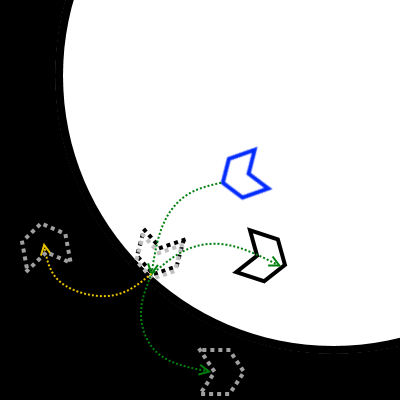
Let's focus on JUST the dragon head and the node behind it, as the dragon head controls rotations and the node behind it is the most screwed up.

Blue: child node
Black Dotted: the initial transform of the parent at time of reflection
Black Solid: parent node final transform at time of child reflection
Grey Dotted: parent node copy initial transform when created by child
Grey Solid: parent node copy final transform at time of child reflection
Green Arrow: Trajectories from initial position to final position


This works great, but only when the head is not turning at any point in time between the reflection of the head and the reflection of the child tail node. Since most of the game is spent turning, this simple position derivative will not work for changing velocities.

It just creates a copy of the parent node, and makes that transform continue forward until the child reflects. During this time period, the child node does it's usual "RotateTowards" behavior on the head copy. At which point, the parent node copy switches parents back to the real head, and destroys the copy.

The Conclusion

So, my conclusion is that the parent node copy must account for changes in rotation and velocity due to actual parent node turning. There are a few ways to do this, but first let's look at a diagram of what this will look like when rotations are accounted for. Compare the transforms of this diagram with those of the above diagram and it should become apparent why the latter should theoretically work:
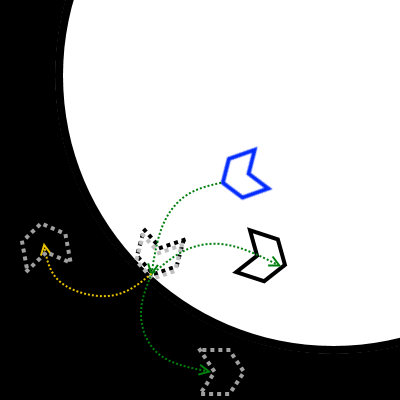


The idea here is simple: Just continue the trajectory as if the head had never hit the wall. This is where we'll have to test and see what happens. The gold trajectory is where I predict the correct final position of the head to be, but the green trajectory is also possible.

The Code Solution to the Conclusion

Theoretically, if in every physics step I set the head copy's trajectory equal to the inverse of the real head, it should work. The child node will reach the point of collision under the EXACT same conditions (with the correct rotation and velocity) that the head experienced when it reflected. As such, the child should reflect in the EXACT same manner as the head did, and the reflection should be successful.

Alternatively, if this slightly more elegant solution doesn't work, I have another. Instead of even creating a copy of the head:
1) Save off the position of the head at the impact point.
1.5) For testing, save off the rotation of the parent at the time of impact as a unit vector. We can use this to check against the actual unit vector of the reflection of the child.

2) Every physics step, obtain a vector from the collision point to the position of the actual head, NOT normalized.

3) Subtract this vector from the reflect position we defined in step 1.
4) We now have the position the dragon head would have been if it hadn't reflected (the gold dotted line)

One problem I haven't completely worked out with these methods is recalculating the time it will take for the child to reach the parent reflect position. Currently, it derives this time from a linear distance, but, as you can see, the distance is not linear. I need to measure the length of that curve. That cannot be one calculation, though, due to the case that the player stops or starts rotating during that time period. So, like the updating position, that time variable will also need to be updated according to the trajectory of the parent node.

Friday, January 29, 2016

Production Post 2 : Moving the Node Dragon

The first (and still ongoing, but coming to a close) tasks for the new programming team have been regarding dragon movement. We wanted 5 different movement schemes (including the legacy rotation scheme) to be changeable at runtime, so we can add new types of playable dragons. Given the relatively large size of the programming team (4), it is crucial that these schemes are highly detailed and polished; and bug free. I couldn't have thought of a better set of tasks to welcome three new programmers to the team than four new movement schemes. It gives us a chance to all work relatively independently on 4 unique sets of code, while requiring that that code be implemented in such a way that it can be brought together easily at runtime.

This hasn't been an easy task by any means, though. Given that the tail functioned in some pretty heinous ways (if it looks polished enough move on to the next thing), and that the tail is the better half of all five movement schemes, getting everything going has been a challenge.


But let's talk about the state we've gotten it to! I'll start with how the head moves, as it is the driving force of the whole system.


Setting Up


We'll start by defining these four variables, publicly modifiable in the editor. These will control the rate at which our movement schemes move.


Next, in our Start() function, we add all five movement scheme scripts to the dragon's head, as components. We immediately disable all of them, and then make a call to the same function that will allow us to change movement type at runtime.


The function that lets us switch movement schemes at runtime. When the previous movement type != the current one, we switch contexts to the new one.


Movement_Behavior abstract class


Now that everything's instantiated, we can get the head moving. I'm only going to post about the base class that our behaviors inherit from:

abstract public class Movement_Behavior : MonoBehaviour

Since all of our movement schemes always move forward (unless paused), we can always move forward in the direction we are facing:

head.velocity = head.transform.forward * mForwardSpeed;

For now, we'll separate the forward motion from the rotation, and just focus on making the tail nodes smoothly look at the node in front of it. A simple LookAt vector can make the dragon function, but making it smoothly function is a bit more difficult.

AngleSigned is a function which returns the angle between two vectors as a value between [-180, 180].
mRigidbody is the dragon's head's Rigidbody component

Currently, adding a meaningful rotational acceleration seems to make the tail separate, and is largely unnoticeable. So, in our current implementation, we just set the acceleration to be higher than the max velocity so it always rotates at the max velocity.

Tail_Behavior

In order for the tail nodes to not slowly separate from each other, we use about the same RotateTowards function above. I've found that if the angular velocity of the tail is shorter than that of the head, then the tail will peel apart. This is because the magnitudes of the tail node velocities are the same, but the directions are not, so this slightly-off direction will in a sense steal some of the velocity's speed. These effects are amplified the further away a tail node is from the head.

We tell each tail node about the node in front of it, like a forward linked list. That parent node's position is used as the seekPos parameter we passed into the function above. Here's a snippit from that:


And that's the core of how the dragon moves!


Saturday, January 23, 2016

Production Post 1 : A New Team

Before now, I hadn't worked with more than one other programmer on a game. Now, halfway through the project with a codebase I wrote, the lovely Abner, Vasily, and Will have joined the team. This makes me the de-facto lead programmer, a role I am not terribly familiar with but am quickly getting used to. What this really means is I have a few more responsibilities, and a bit more work to do than usual.

For one I have to, in certain ways, manage the programming team. I am completely confident in Abner, Vasily, and Will to get their work done on their own, but I have to make sure we all have tasks to be working on, and I have to make sure the tasks are divvied up fairly and according to their skillsets when applicable. Our first task was to make 4 different movement styles for the dragon, all of which are predicted to be in the game. The first thing we did to make this happen was to fix the tail that I had hacked together months ago. It worked "fine," but any change in speed would have to be accompanied by manually changing this variable called "power" through trial-and-error to some arbitrary value so the tail wouldn't drift apart. The first work session went, I think, fairly smoothly for a first work session with an unfamiliar codebase. Will had a fix in mind that I did not agree would work, and I had a fix in mind, so Will and over-the-shoulder Abner worked together on that fix while over-the-shoulder Vasily and I worked on my fix. About an hour later, mine worked and Will's didn't, which was to be expected considering I wrote the code to begin with.

Unfortunately, about an hour of that 2.5 hour session was spent with essentially everyone watching me program since that work was blocking everyone else from working. I see this as a failure on my part, but now I know going into the next session that I need to be sure there is no pipeline block like that.

The next work session went a lot better. We all sat at our own computers, all working in tandem on our respective movement schemes. There was a point where we were all actually trying to solve the same problem: converting touch position in screen pixel coordinates to 3D world coordinates. Abner found a great solution for getting the proper z-axis coordinates, and we all used it.

As far as lead programmer responsibilities go, I am also responsible for making sure we have proper build numbers and making a changelog every week. I also want to make it clear that all four of us have an equal say: if there is dispute over how we should approach a problem we will discuss it and reach a unanimous decision. I'd say we are all about equally competent programmers: the main thing I will be doing as lead programmer is scheduling work sessions, taking large tasks and breaking them up into smaller tasks, making sure everyone always has something to do, and writing up documents. Fun! I'm looking forward to seeing the technical achievements we can accomplish with four programmers!

Tuesday, December 15, 2015

Capstone Post 7 : Post Mortem

What Went Right

1. Iteration

We nailed this on the head. At the beginning of the project, we had a new game direction about once a week. We started with a super simple game: Tap Zap, which was a game where you controlled lightning by tapping and tried to avoid obstacles. We decided we liked the trail left behind by the lightning and pretty much nothing else, so the next week we had a game where you moved a little particle ball around and collected spheres. Those spheres became your tail, which is where the idea of controlling something with a tail came into play.

The following week we took that and wanted to make a game about making little solar systems. So we prototyped that out, where you would circle around and eat your tail to make planets that orbited a sun. We needed some sort of gameplay, and we were thinking about how bodies interact in space. Obviously, when a planet hits an asteroid (the nodes of the tail), the asteroids break apart. So now we had this game where you flew around collecting asteroids and making planets: the planets would break your tail. This was frustrating to testers, so we did away with what didn't work and kept what worked.

I won't go into every iteration here, but the reason our game turned into what it is now is because we kept throwing away the stuff that didn't work and prototyping new ideas. It was sort of a running joke in the class: nobody could really tell where we were headed or what the game even was from week to week. Each week was a surprise to both the class and to us. Most of the development process was a cycle of prototyping, followed by critique, followed by new ideas, and back to a new prototype. For this reason, I was worried throughout the whole project that our game would fall short, that the idea would fall apart and we would never recover, and that the ideas we had didn't have enough depth or complexity. This drove innovation -- I think now that we're halfway through we have something that is truly unique, and large iteration moving forward is certainly not off the table.


2. Planning

Even though for most of the process we had only inklings of what we were going to end up making, we followed a rigid schedule. I have to give a shout-out to Shannon, our producer, for driving us through each milestone. We had overarching things we had to accomplish by specific dates, but this schedule was purposefully vague enough to be able to iterate as heavily as we did. We blazed through the stage challenges, each time with something very different but clearly more complete than the last. This certainly wasn't without frustrations and conflicts (it still isn't on iOS, sorry Shannon!!). We had to push a couple deadlines back because we had so radically changed the game that there was just no way we could prototype the newest idea in two or three days. But since we had now pushed the deadline back, as developers it seemed we had to just get the new idea finished for the next stage challenge. This pressure definitely kept us all busy, with a drive to stay on schedule. The schedule was made with a release in mind next semester, so we were always working towards that ultimate goal and if we pushed things back, it became very clear how it would affect the trajectory of this project.

In addition to this, we had a set weekly schedule for meetings. There was no confusion over when meetings were: if for some reasons someone forgot, our Slack had Google Calendar integration so slackbot would give everyone a little heads up 30 minutes before each meeting. Every single night at 11pm we had an online Scrum meeting, which only took about 5-15 minutes, but kept us all up to date with everyone else's work.

3. Adaptability and Cross-Discipline Utilization

Being a four person team gave us the obvious limitations that come with a small development team. We realized that a full, textured 3D game just wasn't going to happen with the limitations our artist presented us with. So, we came up with the idea to make the whole game shadow puppets, stemming from a concept of having planets cast shadows away from the sun (when it was still a solar system game). This let us keep the game fully 3D, but instead of rendering textures we just rendered shadows. This gave us a unique an interesting art style while also significantly lowering the art scope. When this proved to still be too much for our artist, our designer and producer made a few assets to make up for this absence. This is what I mean when I say cross-discipline utilization: Our designer helped with the programming, the whole team (besides me, I can't art well) made art, Our designer did all the audio for our game, and we all helped with the design.

4. We Liked Each Other

This is huge for any team, but we all genuinely appreciated each others' company for the most part. I remember coming up with the "you're a dragon putting on a ballet-like performance for the gods" with Zac: we were walking towards his apartment and needed a new direction for the game to take. So we brainstormed, and after a few left-field ideas we left the ballpark almost entirely with this new idea. It was all very casual: we hadn't scheduled a meeting to come up with a new direction, but rather it came naturally on an otherwise innocuous walk. Stuff like this happened a lot: I think the majority of our game-changing ideas came from outside meetings, which paid off in the end.


What Went Wrong

1. Weekly Task Confusions

While we had sprint planning meetings every Monday, and those were super helpful with user stories, there were a few occasions where members of the team just did not know what to do during the week as far as specific tasks go. A couple times, we reached full on conceptual blocks which would not allow anyone to do any work because the game had to change drastically in the next day or two. We handled these, I think, about as best as we could, but it was certainly difficult to know you need to do work and not really know what that work is.

2. Repository Management

Especially at the beginning, this was pretty rocky. Our repository was a mess: meta files and clutter everywhere, projects named incorrectly (The most recent project file is, to this day, still called "HungryHungryHyppo"), and general disorganization in folder structure. Virtually zero naming convention in the art files and no organization in that folder structure made it difficult to find the assets we were looking for. Old builds and old project files cluttered up incorrect folders (branches, trunk, tags), and we didn't use build numbers. Currently we are in version 0.8.0, but wow that is very arbitrary. It certainly got better over time, but a more organized repository would have made us more efficient, especially towards the beginning of the project.

2. Production versus Game

At the beginning, our producer really drove home the point that we would be releasing this game. In order to do so, we would have to keep the game in scope. This turned out to be a great thing: today we sit in a very good position to be able to release a polished and complete game. Throughout the project, especially at the beginning, I think our producer underestimated our abilities a bit. While I understand keeping things in scope was a priority, there is a such thing as too little scope, and in my mind it's just as dangerous for a senior team. There was always this push from programming and design (art is always going to be out of scope) to make a more complex game, followed by a push back to keep the game in scope. This certainly wasn't an unhealthy relationship, but I just felt like I had a lot more to offer than what I was being assigned throughout the first half of the project. Fairly often, I would sit down and complete all my week's tasks in one sitting, without much strain on my programmer-brain. At the same time I didn't want to change the design to give myself more work, I do feel that I could have done more in the first half of the project than I was given to do. 


Tuesday, November 17, 2015

Capstone Post 6: Interpolating Given Time

Linear Interpolation is a hugely powerful technique, and can be very easy to implement in your code! If you implement it properly. Simply, it is a function of time which returns a value between an initial value (a) and a final value (b), given a time (t). Time (t) is a normalized value which represents the fraction of how far along in the Lerp we are. Calling it time is a bit misleading, but bear with me.

Knowing this, let's take a look at the whole one line of code that let's us interpolate given an a, b, and t:

Taking a look at the above function, let's plug in some example values. If I am Lerping between 5 (a) and 15 (b), and I am 0% of the way there (t = 0.0), this function will return 5. If I am 100% of the way there (t = 1.0), then it will return 15. If I am 50% of the way there (t = 0.5), this function will return 10.

Now that we understand how Lerping fundamentally functions, let's do something super simple with it: move from point a to point b in Unity C#. A really simple interpolation we often must perform is moving something a distance in a given amount of time. Well here ya go, pretty much exactly as you might have expected:


It's as easy as that! But by no means does Lerp stop here. What Lerp is really good at is interpolating anything. Position, rotation, color, velocity, acceleration, scale, even strings of text! Anything with a start and desired value can be interpolated between.

The real power of linear interpolation heck yeah there's more comes in to play when we do fun things with our t variable. A graph of the distance over the time for the above code would look something like this:


Very simple. However, we can run t through ANY function and it will interpolate properly as long as we normalize it to [0.0, 1.0]. What this means is we can turn ANY graph into a change in position, rotation, color, etc.


smooth: t = t*t*(3-2*t)
smoother: t=t^3*(t*(6*t-15)+10)
If you can graph it, you can run t through a function and Lerp it that way. Have fun out there!


Friday, November 06, 2015

Capstone Post 5: With a Machete

I worked a lot today. I woke up after working on capstone and then went to class and then worked on capstone and then went home quite late to write an indefinite number of blog posts (it's going to be two, counting the one before this).

A period of this particularly stuck out as the happiest. Zac and I got on the same page in terms of the new design direction of our game, discussing exactly how everything should work mechanically so I can program these things without having to make too many as-I-go-decisions. So, with this very specific approach to how everything would work, I began brain scheming and dug into the code. I knew I needed to change how things were set up because of the new design I talked about in my previous post. Having done a bit of work on it already, the architecture was headed in the direction of being a complete mess of useful code mixed in with outdated or useless code.

If you're building a house and you mess it up in the beginning it's fine; just knock down the house and start over. But if you already have the wooden frames of most of the rooms up, and you realize you put the kitchen inside the living room or something, you can't just tear down the house and start over. You tear down the studs and other wooden things and rebuild the kitchen somewhere else.

And so began the most joyous time of this night. So I got to both analyze and make changes to the existing, useful code and all that, but the code we didn't need anymore. Since we cut orbiting for cooler motion and arrows because they were lame, I had the pleasure of spending like an hour hacking through this codebase
with a machete.
As I was making boulders collide with the tail and the biomes, I came across the arrow collision code. Since we did away with the arrows, I got to select that code, and delete it. And every time I pressed that backspace key thereafter, my heart grew warmer. I fell down a beautiful rabbit hole: arrows spawn in Game Manager *SLASH!* arrows have a prefab *DELETE!* arrows have a script *NO PRISONERS*. Then I compiled, and wow look at all those lines of code that reference the arrows I had deleted out of existence. Well time for all that code to die *OVERKILL!!*.


But wait, planets still orbit and we don't want that, also the way the planets move (if at all) needs to be dictated from the BiomeProgressionManager. And so I went on to remove probably about a third of all the code in our game. It was a blast.


 Special thanks to Subversion! Without you that would have been significantly more worrisome.

Capstone Post 4: Progression Zoom???

The amount of work I have to get done on this game between now and Saturday, and subsequently the following Monday when we will be challenging Vertical Slice, is a little terrifying. We've taken yet another screeching left turn with Serpent Shadows, and this is the last turn we get this semester. I'm actually really excited about this! I've scheduled out everything I have to do (half on the task board, half in my brain board), and I know this is possible on my end (with room for polish, of course!). While the mechanics of the game have not changed that much, it turns out the code will need (and as of tonight, has received) heavy iteration.

We are working with leveled system now: at the end of a "round," the player will enter one of the biomes. The game will then pick up inside that biome, with challenges themed based off the theme of the biome. This biome will have another set of biomes in it, and those will have sets of biomes in them, and as you go deeper into the very-hard-to-explain game world, the biome themes stack with each other. So you go into a mountain biome, there are falling rocks, then from there you go into a river biome, there is both a river and falling rocks, and so on. We've dubbed it "biome-ception," for lack of a better explanation.

Concept: I shrink myself and eat pizza forever
This calls for a pretty big paradigm shift in the code I've been working with. I hadn't structured this in a way that is conducive to this new biome-ception, as I had no way of predicting that we would go this way. I don't typically set up code to work this way. So I had my GameManager, ya know, spawning arrows and keeping track of planets and whatnot. But now all of a sudden, I need to have some sort of "GameManager" for each level of biome-ception. I don't want to load a new level to do this. I want the transition between levels to be a seamless zoom, like the above pizza.

So I've been tasked with creating a code paradigm that's pretty significantly different than anything I've attempted before. It's one thing to load the next level, or move from one region to another in a game space. It's another to keep zooming into the next "level." So I have a BiomeProgressionManager class attached to my GameManager GameObject. This class handles all the biome spawning for sub-levels (but not the overworld, because we will revisit the overworld later in the game). GameManager still handles the biomes in the overworld, as well as data saving/ parsing from the overworld.

BiomeProgressionManager holds integers to keep track of how many levels of type mountain, river, etc we have gone into. It also keeps track of the current spawned biomes, as we do not need to save the ones from the previous level (unless that level was the overworld). It also holds the level prefabs to instantiate: let's talk about those.

So I currently only have the MountainLevel prefab, which has the MountainLevel script attached to it. This script will handle all obstacle spawning, and decide the difficulty curve as the number of mountain levels the player has been through increases. On instantiation, it will do it's own thing. The RiverLevel prefab will do much the same thing. So, say the player goes through a Mountain level, another Mountain level, and then a River level. Well, the next level would be Mountain (level2), River (level1). Since I'm using these prefabs, I can simply stack them on top of each other to handle this "branching" progression. The river level can be seamlessly combined with the two mountain levels to create the mountain1-river2 level. Interestingly enough, the code has taken on an inception-style structure, much like the game.

Luckily Zac and I have no problem sitting next to each other in a lab until the sun rises because it's going to take a lot of balancing to execute this well.

Side note: I effing LOVE this idea. We needed a weird progression in the game, and we came up with one. No currency, no stars or coins or powerups. It fits the game so well I just want to hug it. And make it happen. It's going to be a long week.